
The transition to electric vehicles has brought about a new era of automotive technology, and at the heart of this revolution lies the battery. For Tesla owners, understanding the health and longevity of their vehicle’s battery is paramount. Thankfully, Tesla has equipped its vehicles with an intuitive battery health tool, empowering users to monitor degradation and gain a more precise understanding of their car’s range capabilities.
The Natural Progression: Understanding Battery Degradation
Like any battery, the lithium-ion packs that power Tesla vehicles undergo a natural process of degradation over time. This isn’t a sudden failure but rather a gradual reduction in the battery’s original energy capacity. The primary drivers of this degradation are the chemical reactions inherent in the charging and discharging cycles. While other factors like temperature extremes and driving habits play a role, the sheer number of charge cycles and the amount of time the battery spends at very low or very high states of charge are significant contributors.
Think of your battery’s health as a measure of its remaining “fuel tank” size. A battery with 85% health can store and deliver approximately 85% of the energy it could when it was brand new. Consequently, your vehicle’s maximum range will also be around 85% of its original specification.
It’s important to note that the most noticeable period of degradation typically occurs within the first few months of ownership. During this initial phase, you might observe a steeper decline of 1-3% as the vehicle’s Battery Management System (BMS) goes through a crucial recalibration process. This recalibration allows the BMS to provide a more conservative yet ultimately more accurate estimation of your vehicle’s real-world range and charging capacity.
According to Tesla’s own data, the average rate of battery degradation is around 15% over 200,000 miles. Interestingly, the first year of ownership often accounts for about 5% of this total degradation. This highlights the sophistication of modern EV battery management systems, which have become significantly more accurate and intelligent in mitigating long-term capacity loss compared to earlier electric vehicles.
For those keen to delve deeper into the factors influencing the lifespan of a Tesla battery, numerous resources are available online.
The Shield of Assurance: Tesla’s Battery Warranty
To provide peace of mind to its customers, Tesla offers a comprehensive warranty that covers both the vehicle’s battery and the drive units. These warranties are designed to protect owners against significant battery degradation, guaranteeing a minimum of 70% pack retention within the warranty period. This means that if your battery health falls below this 70% threshold while still under warranty, Tesla will replace your battery pack.
The powertrain and battery warranty offered by Tesla extends beyond the standard vehicle warranty, underscoring the company’s confidence in the durability of its core EV technology. This extended coverage ensures that your investment is protected against substantial capacity loss over a significant period.
It’s worth noting that the specific terms of the battery and drive unit warranty vary slightly depending on the Tesla model and configuration. Here’s a breakdown of the warranty coverage:
Understanding these warranty terms is crucial for every Tesla owner. And if you’re considering joining the Tesla family, remember that using a referral link like mine:
Taking Control: How to Test Your Tesla’s Battery Health
While observing the estimated range at a 100% charge can provide a rough indication of battery health (by comparing it to the vehicle’s original range), Tesla has integrated a dedicated tool for a more precise assessment. This user-friendly feature offers insights practically identical to those accessible through the more technical Service Mode, delivering the same reliable test and results.
To access this battery health test, navigate to Controls > Service on your Tesla’s touchscreen. Then, scroll down and select Battery Health. Tapping this button will display the requirements for running the test, along with the date and health percentage of your last completed battery test.

Preparing for the Test: Requirements and Duration
Running the battery health test requires a bit of planning. Your Tesla needs to be plugged into a Wall Connector or Mobile Connector for a continuous period of up to 18 hours. The charger must be capable of providing at least 5 kW of power, which translates to approximately 20 amps at 240 volts.
The total duration of the test can vary depending on several factors, including your vehicle’s battery size, your charging speed, and the initial battery level. If you need to use your vehicle before the test is complete, you have the flexibility to stop it at any time.
Another crucial requirement is that your vehicle’s state of charge must be at 20% or less before initiating the test. This necessitates some foresight in planning when to run the diagnostic.
For a successful battery health test, ensure the following conditions are met:
- Vehicle is in Park.
- Battery level is at 20% or less.
- Vehicle is connected to the internet.
- No software updates are scheduled.
- No battery or thermal alerts are active.
- Vehicle is connected to an AC charging station.
- AC charging equipment can provide at least 5 kW of power.
If you’re excited about the prospect of owning a Tesla and utilizing such insightful tools, don’t forget to use my referral link when placing your order:
The Process Unveiled: Running the Battery Test
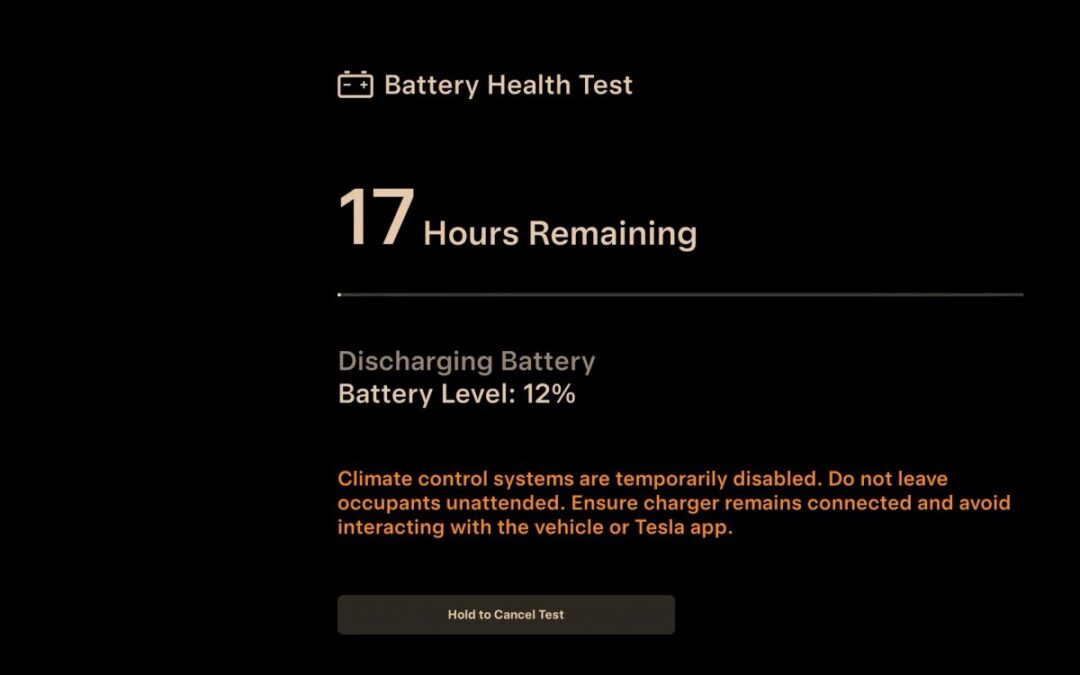
During the battery test, your Tesla will strategically discharge and then recharge its battery to calibrate the BMS. Starting the test with a lower state of charge is beneficial as it shortens the test duration and minimizes energy wastage.
To discharge the battery, the vehicle will engage the motors and the heat pump or heater until the battery is nearly depleted, after which the charging process will commence.
It’s not uncommon to hear your vehicle’s fan operating at maximum speed and becoming quite loud, especially if the test is conducted in an enclosed garage while the vehicle is discharging. This is a normal part of the process as the vehicle actively uses up energy.
Deciphering the Results: Understanding Your Battery Health
Once the battery test is complete, you’ll receive a notification via the Tesla app. You can then view the results either on your vehicle’s touchscreen or within the Tesla app by navigating to Service > Battery Health.
Most Tesla vehicles will exhibit a battery degradation range of between 10-20%, depending on factors such as charging habits, the age of the battery, and overall usage.
If your test results indicate a battery health of 70% or less and your vehicle is still within the warranty period, it’s advisable to contact Tesla to discuss a potential battery replacement.
An important point to remember is that the battery test recalibrates the vehicle’s BMS. Consequently, you might observe an adjustment in your vehicle’s estimated range after the test. Rest assured, the actual capacity of your battery hasn’t changed; the vehicle is simply providing a more accurate and refined estimate of its real-world range.
Planning to order your own Tesla and experience this advanced battery management system firsthand? Using my referral link:
Important Considerations: Test Limitations and Best Practices
Given that Tesla’s battery test involves a deep discharge to near 0% and a subsequent charge to 100%, it’s recommended not to perform this test frequently. Tesla’s system also limits users to one battery test every six months through the standard menu, although accessing Service Mode allows for more frequent testing for technically inclined users.
A crucial point to note after the battery test completes is that the vehicle will typically hold the battery at a 100% charge. While this is necessary for the calibration process, it’s generally not the optimal long-term practice for battery health, especially for standard lithium-ion batteries (non-LFP). Ideally, you should plan to drive your vehicle shortly after the test concludes. If immediate driving isn’t possible, it’s a good idea to engage the climate control system to utilize some of the energy and bring the battery level down closer to your typical charging limit.
Vehicles equipped with LFP (Lithium Iron Phosphate) batteries are less sensitive to being stored at 100% charge for short periods. However, for all other Tesla models, it’s best to avoid leaving the vehicle at a full charge for extended durations unless you are about to use it.
By understanding how to utilize Tesla’s battery health tool and by adopting mindful charging habits, owners can gain valuable insights into their vehicle’s performance and ensure the longevity of their battery. And for those on the cusp of joining the Tesla community, remember that your journey can be even more rewarding by using a referral link like mine: