

The relentless pace of innovation at Tesla continues unabated, and the arrival of the 2025 Spring Update brings with it a compelling array of enhancements designed to elevate the driving experience, bolster safety, and further integrate the vehicle into the digital lives of its owners. While the initial glimpses into the release notes offer a tantalizing preview, it’s crucial to remember that the full spectrum of features may vary depending on the specific hardware configuration and the geographical region. To truly grasp the comprehensive nature of this update, be sure to explore our dedicated 2025 Spring Update article, which delves into the nuances and broader implications of these changes.
Illuminating the Road Ahead: Adaptive and Matrix Headlights
Driving at night is about to become significantly safer and more convenient for Tesla owners equipped with the latest headlight technology.
Adaptive Headlights (Not relevant in the United Kingdom)
While this particular feature isn’t applicable to drivers in the United Kingdom due to local regulations, it’s worth noting the advancements Tesla is making in headlight technology for other regions. Adaptive headlights dynamically adjust their beam pattern based on driving conditions, optimizing illumination without causing undue glare for oncoming traffic.
Matrix Headlights (Models: New S, 3, New X, Y)
For owners of newer Model S, Model 3, Model X, and Model Y vehicles, the introduction of Matrix Headlights marks a significant step forward in nighttime visibility. These intelligent high beams possess the remarkable ability to adapt in real-time to the presence of other road users, including drivers and cyclists. By precisely detecting these individuals and selectively dimming individual pixels within the headlight array, the high beams can remain active more often, providing superior illumination of the road ahead while simultaneously minimizing glare and ensuring the safety of others.
Activating this enhanced visibility feature is a breeze. Simply navigate to Controls > Lights > Adaptive Headlights on your Tesla’s touchscreen.
Considering upgrading to a Tesla with these advanced lighting features? Using my referral link when you place your order can unlock exciting benefits:
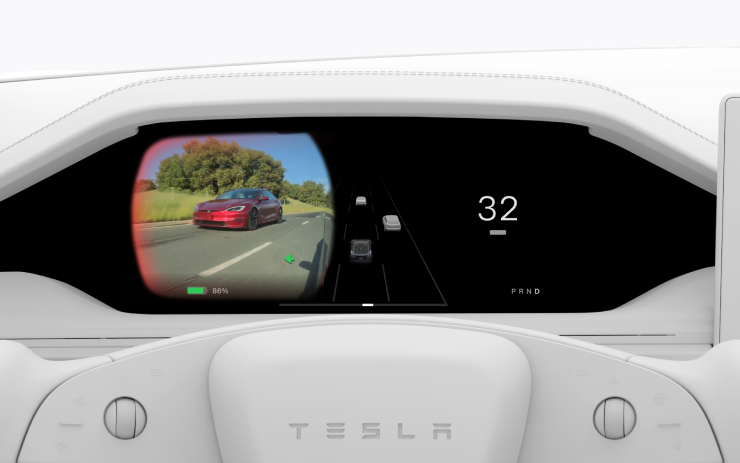
Enhanced Awareness: Blind Spot Camera on Driver Screen
Staying aware of your surroundings is paramount to safe driving, and the 2025 Spring Update introduces a valuable enhancement to the blind spot monitoring system.
Blind Spot Camera on Driver Screen (Available Worldwide, Models: New S, New X)
For owners of the newest Model S and Model X vehicles, the feed from the Blind Spot Camera is now seamlessly integrated into the instrument panel directly in front of the driver. This intuitive placement provides a quick and natural way to visually confirm the absence of vehicles in your blind spots before making a lane change.
To enable this convenient feature, go to Controls > Display > Automatic Blind Spot Camera and select Driver Display.
Thinking about the added safety and convenience of a new Tesla? Don’t forget to use my referral link for potential rewards:
Tailoring Your Journey: Alternative Trip Plans
Planning road trips in your Tesla is about to become more flexible and aligned with your individual preferences.
Alternative Trip Plans (Available Worldwide, Models: S, 3, X, Y, CT)
The navigation system now offers a selection of multiple trip plans, empowering you to choose the route that best suits your specific travel needs and priorities.
- Fastest: For those prioritizing speed and efficiency, this option calculates the quickest route to your destination.
- Best Amenities: If comfort and convenience are key, this plan prioritizes charging stops located near highly-rated restaurants, shops, and restrooms that are currently open.
- Fewer Stops: For travelers who prefer to minimize charging interruptions, this option optimizes the route to include the fewest possible charging stops.
This enhanced trip planning functionality provides greater control over your journey, ensuring a more personalized and enjoyable travel experience.
Ready to explore the open road in a Tesla with intelligent trip planning? Use my referral link when ordering:
Navigating Your Way: Avoid Highways
Sometimes, the scenic route or a path less traveled is preferred. The 2025 Spring Update caters to this desire with a new navigation option.
Avoid Highways (Available Worldwide, Models: S, 3, X, Y, CT)
The navigation system now offers the ability to avoid highways when possible, providing an alternative route that bypasses major roadways. This can be particularly useful for those seeking a more relaxed driving experience or wanting to explore local roads.
To utilize this option, simply navigate to Controls > Navigation > Avoid Highways.
Considering a Tesla for more than just highway driving? Remember to use my referral link:
Enhanced Surveillance: Dashcam Update and Side Camera Recording
The integrated Dashcam and Sentry Mode systems are receiving a significant upgrade, providing even greater security and peace of mind.
Dashcam Update and Side Camera Recording (Available Worldwide, HW4? Models: New S, 3, New X, Y)
For vehicles equipped with the newer Hardware 4 (HW4) cameras (including the latest Model S, Model 3, Model X, and Model Y), the side cameras located on the B-pillars will now be recorded to both Dashcam and Sentry Mode clips. This expanded coverage provides a more comprehensive view of events occurring around your vehicle.
Furthermore, the Dashcam Viewer app has been updated with a convenient grid view, making it easier to access and review recordings from all available cameras.
Interested in the enhanced security features of a modern Tesla? Don’t forget to use my referral link when you order:
Personalized Convenience: Save Trunk and Frunk Height Based on Location
Tailoring your Tesla to your specific needs and environments is becoming even more refined.
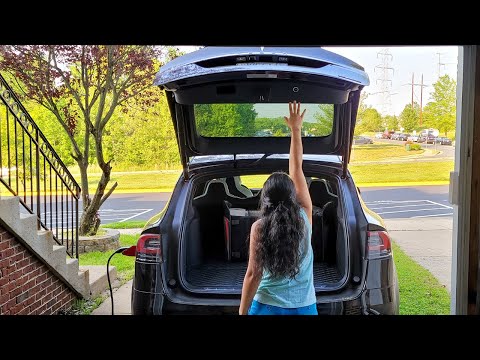
Save Trunk Height Based on Location (Available Worldwide, Models: New S, 3, New X, Y)
You can now customize the opening height of your trunk and save it as the default or associate it with a specific location, such as your garage. This prevents the trunk from hitting low ceilings or other obstructions. To set a desired height, simply pause the trunk while it’s moving using the touchscreen. Alternatively, manually adjust the trunk to your preferred height, then press and hold the trunk close button until you hear a confirmation chime.
To revert your trunk opening to the factory default height or to clear any saved locations, navigate to Controls > Service > Remove Saved Locations.
Save Frunk Height Based on Location (Available Worldwide, Models: CT)
For Cybertruck owners, the same convenient customization is now available for the frunk (front trunk). You can customize its opening height and save it as the default or for specific locations. The setting process mirrors that of the trunk: pause the frunk using the touchscreen during movement or manually adjust to your preferred height and then press and hold the frunk exterior button until a chime confirms the setting.
Similarly, to reset the frunk opening to the factory default or clear saved locations, go to Controls > Service > Remove Saved Locations.

Enhanced Safety: Lane Departure Avoidance
Tesla’s commitment to safety is further reinforced with improvements to the Lane Departure Avoidance system.
Lane Departure Avoidance (Available Worldwide, Models: CT)
For Cybertruck owners, the Lane Departure Avoidance feature now offers more than just warnings if your vehicle drifts near or out of its lane. With this update, the system can now actively assist in keeping you within your lane. When enabled, a blue indicator line will appear on the touchscreen, visually indicating which lane marking is being crossed. You can customize the Lane Departure Avoidance settings in Controls > Autopilot > Lane Departure Avoidance.
Furthermore, you can enhance safety by enabling Emergency Lane Departure Avoidance, which provides more assertive corrective action in critical situations. This option can be found in Controls > Autopilot > Emergency Lane Departure Avoidance.
Prioritize safety with the advanced driver assistance features of a Tesla! Remember to use my referral link:
Seamless Driving: Comfort Drive Mode in Autopilot
The Autopilot experience is becoming even more refined and comfortable.
Comfort Drive Mode in Autopilot (Available Worldwide, Models: CT)
For Cybertruck owners, your vehicle will now automatically transition to Comfort Drive Mode when Autopilot is engaged. This setting, enabled by default, likely adjusts acceleration and deceleration profiles for a smoother and more relaxed driving experience during Autopilot operation.
To disable this automatic transition, you can go to Controls > Dynamics > Use Comfort Drive Mode in Autopilot.
Experience the smooth and effortless driving of a Tesla with Autopilot! Use my referral link when ordering:
Global Communication: Keyboard Languages
Staying connected in your preferred language is now easier than ever.
Keyboard Languages (Available Worldwide, Models: S, 3, X, Y, CT)
You can now easily switch between different language input methods on your Tesla’s touchscreen keyboard. To add additional keyboards, navigate to Controls > Display > Keyboards. To switch between your enabled languages, simply long-press the global icon on the keyboard and select the desired language.
Enjoy seamless communication in your Tesla, no matter your language! Consider using my referral link for potential benefits when you order:
Powering Your Life: Keep Accessory Power On
Extending the utility of your Tesla beyond just driving.
Keep Accessory Power On (Available Worldwide, Models: New S, 3, New X, Y, CT)
You can now continue to use or charge devices through the low voltage outlets, USB ports, or the inductive phone charger even after exiting your vehicle, as long as the battery’s state of charge remains above 20%.
When this feature is enabled, these power ports will remain active even when you are not present and the vehicle is not in use. It’s important to note that this may increase the vehicle’s overall power consumption, even if no devices are actively connected.
To enable this convenient feature, go to Controls > Charging > Keep Accessory Power On.
Imagine the added convenience of your Tesla powering your devices on the go! Use my referral link when you make your Tesla purchase:
Minor Yet Meaningful Updates
The 2025 Spring Update also includes a collection of smaller yet impactful enhancements:
- When viewing a charger location page, nearby restaurants, cafes, and shops within walking distance are now displayed at the bottom, making charging stops more convenient (2021+ Model S/X, All Model 3/Y).
- Media search results are now filtered by sources, providing faster and more streamlined access to your favorite content (All models).
- Sign in with your Amazon Music Free account, requiring Premium Connectivity or an active WiFi connection (All models).
- You can now shuffle entire Apple Music playlists containing more than 100 songs (All models).
- See what song will play next on YouTube Music playlists in the ‘Up Next’ view of the media player (All models).
- In your Navigation settings, you can now choose to show or hide chargers on the map that are not owned or serviced by Tesla (2021+ Model S/X, All Model 3/Y).
- The new rear camera view offers a wider field of view, improving visibility for rear cross-traffic (HW4 Model Ys).
- If your personal hotspot is enabled, it will now automatically connect to your vehicle once you start driving, eliminating the need for manual reconnection each time (All models).
- The vehicle visualizer in your Cybertruck will now display the precise degree to which a door is open (Cybertruck only).
- Contact photos are now displayed for incoming calls and within the vehicle’s Phone app (All models).
- This update also incorporates important security fixes and general system improvements (All models).
Enhanced Visibility: Camera App Update
An undocumented yet welcome update focuses on the organization of the Camera app.
Camera App (Available Worldwide, Undocumented Models: S, 3, X, Y, CT)
The Camera app has been refined to improve user experience. The repeater camera feeds (side cameras) are now displayed at the top of the screen instead of the bottom. Additionally, each individual camera feed is clearly labeled (rear, left, and right), making it easier for users to quickly identify the desired view.
The 2025 Tesla Spring Update is a testament to Tesla’s ongoing commitment to enhancing its vehicles through innovative software updates. From improved safety features and more flexible navigation to personalized convenience and subtle yet impactful refinements, this update offers a compelling evolution of the Tesla ownership experience.
Ready to embrace the future of driving with a feature-rich Tesla? Don’t forget to use my referral link when placing your order and potentially unlock exciting benefits: